Posts

ILP "Design" - Power Point

I chose the "Design" option and created a power point about the life cycles of a butterfly. I plan on becoming a Kindergarten teacher so I thought this was a relatable topic. https://adminmyfsu-my.sharepoint.com/personal/ods15b_my_fsu_edu/Documents/ILP%20Design%20-%20power%20point.pptx?web=1

Blog Journal 10

I genuinely enjoyed learning about how to make surveys and how to organize the data from your surveys on Monday in class. For teachers of older students, perhaps middle school and up, these surveys could be a great way to get feedback from your students. For example, at the end of the year you could have an evaluation survey using this technology and the students could be able to give you feedback and explain what they did and did not like about class that year so that you can make adjustments in the future. However, I plan on becoming a kindergarten teacher so this technology would probably only be used with parent/teacher interactions. It could be an effective way for them to communicate expectations and also give feedback to the teacher. It could also just be a fun way for the teacher to get to know the parents of her students through a fun and light-hearted survey. I have enjoyed the concept of a blog in our classroom this year. It is helpful to see how my class mates are respond...

Blog Journal 9

The flipped classroom is a very interesting concept. It "flips" the way learning is typically accomplished. Usually, students learn by listening to a lecture or lesson of some sort presented by the teacher in a classroom setting and then are assigned homework to do later to deepen their learning. However, the flipped classroom does the exact opposite. The students are expected to watch a lecture from an online resource on their own prior to coming to class. Then, they spend their class time doing activities that will further the concepts covered in the video lecture. The link below takes you to a site called "presenfationtube.com" which is a resource that I found that would be very useful for a flipped classroom. This would allow the teacher to make a lecture, such as a power point that they could narrate with their own voice and make it available for all students. The students could then watch this video on their own to learn the material and be ready for any class...

Blog Journal 8

Image
Adaptive technologies are a result of the "Americans with Disabilities Act" and they ensure that the education of students is not inhibited due to their disability. The podcast gives the example of how dyslexic people have technologies such as spell check or voice-recognition technology so that they can type effectively. Blind people can use features of technology that speak the words so that they are able to hear and they are not held back by their lack of sight. I have not seen anyone disabled use any of these technologies in my personal experience; however, I have used these technologies on my own and I could see how they would be very helpful to those with disabilities. For instance, I have used the smart board many times in the classroom but this could be an adaptive technology because it has features that could speak the words for blind students or make the words larger for the visually impaired. A challenge I anticipate having while using adaptive technology in my futu...

blog journal 7

Image
So far, I have loved using Twitter for this class. Prior to taking this course, I had never considered Twitter to be an educational resource because I had only used it for social/fun purposes. However, it has been a great way to connect with fellow students in this class. I like to see their ideas and shared articles and how they are managing the assignments of this class. I have not experienced any issues because Twitter was already familiar to me so it was very convenient and comfortable to begin using it in my academic life. I thoroughly enjoyed the Web Page Design assignment, it really made me excited to be a teacher one day. It made me envision how life would be to have my own class and accomplish teachers tasks. I can see how having a class website would be helpful because you can have everything in one place and it is very accessible for parents and students. I would be able to post pictures from the class that the parents would enjoy as well as make important announcements th...

Blog Journal 6

Image
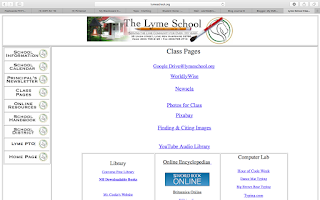
On The Lyme School website their class pages included many resources that the kids could use for their school work. They had things like a google drive link which would allow kids to access group projects easily or possibly make it easy for multiple teachers to edit announcements. It also had a link to show kids how to find and cite sources which would be very useful to kids doing their homework at home. It then divides the links by grade level and class. Each class had useful links that could be utilized in that subject at that age level. For instance, the kindergarten section had a link to counting games. http://www.lymeschool.org/classPages.html As a teacher I plan on using technology to be more efficient and effective. Microsoft is a great tool to do that because of its many functions such as record keeping for repeat projects, spread sheets, presentation features, etc. Websites such as Diigo, which we have discussed during class, will help me be able to book mark resourc...

Independent Learning Project

I created a Prezi that could be used as a short review of how to see shapes in the real world. It would probably be best utilized in a pre-school classroom. Prezi is a great tool for teachers to use and it makes the material you're teaching be more interesting and visually pleasing. https://prezi.com/view/4FUwawHxsDoJ4Xw1hfas/

Blog Journal 5

I think that Web 2.0 technologies can be very useful in a classroom setting. YouTube was used very often in my educational experience from K-12, teachers would find educational videos related to our lesson and pull them up to play. It is a useful visual aid to support some of the lessons and perhaps make it more interesting. I have never used a blog in a classroom setting previous to this course but I can now see how it is a helpful classroom tool as well. I like that we can all see each other's responses and everything is in one place. Twitter has also proven to be a useful Web 2.0 technology so far this semester. It is helpful to be so connected to my classmates in the form of an app that is so familiar and easy to use. https://www.scribd.com/?utm_source=adwords_brand&utm_campaign=Google_Search_Alpha_Brand_US&utm_term=scribd&utm_device=c&gclid=Cj0KCQjw09zOBRCqARIsAH8XF1bFYasNS9o1hjT6rzu3wRzK5YgPEfU6JFmL7ePnqbnLiBJENquqhXAaAhx3EALw_wcB "Scribd" seems l...

Blog Journal 4

I have been interacting with fellow classmates on twitter so far. Many of them have posted intriguing articles that relate to my future teaching career, inspiring quotes, or just updates on how they are managing the course work for this class. It is helpful to remember you are not alone and hear ideas from others on how they are doing the assignments. It is also very helpful when our instructor posts reminders about upcoming due dates; I think that is a great way to utilize twitter in the classroom. I hope to be a kindergarten teacher so I do not see my students using twitter, however it may be a useful tool to communicate to the parents. I could convey quick messages or post pictures of their kids throughout the day so that the parents could be involved and updated about their child's day. The digital divide affects students in the classroom by creating dissension between students who have access to technology and the internet and those who do not. One student may be able to eas...

newsletter

Image
The ISTE standard that I feel most comfortable with is "facilitate and inspire student learning and creativity". I have grown up in an era consumed with technology and I am used to having it at my fingertips as a tool to you to my advantage at any given time. That being said, I feel very comfortable demonstrating to others how to use it in daily life well. Another standard that I feel comfortable with is "model digital age work and learning". I am very accustomed to the technology required for school work and I believe it is very similar to that which a teacher would use. Therefore, I feel qualified to use the technology necessary to effectively use classroom technology in a professional way. Standards that I would need more learning for are ones like "design and develop digital age learning experiences and assessments". This seems like a daunting task for me because I do not feel quite confident enough in my technology skills to be being inventive with th...
The Association for Educational Communications and Technology defines educational technology as the "study and ethical practice of facilitating learning and improving performance by creating, using, and managing appropriate technological processes and resources". A teachers main job is to prepare students for the real world. In the 21st century, the students will most definitely be required to be technologically literate in their future endeavors. Therefore, a teacher should be able to instruct them in that field and familiarize them with it. In the same way, students want to be prepared for their futures, personally and professionally, and that requires being comfortable with technology. The ISTE has set up standards not only for teachers and what they should know about instructing technology but also what students should know as learners in the world of technology. I think it is a very helpful resource and a good baseline that we should all strive for. It has had a major ...
Blog Setup and Learning Style

Image
My prior experiences using technology include recreational use and educational use. I use my iphone daily, like most people. I use my Mac lap top for school and for fun things like Facebook or online shopping. In my school experience I often use my lap top for all my assignments. In high school we were all given iPads to use. Power points and projectors have been a big part of my learning experience from elementary and all through college as well. Teachers use email to communicate to me as a student as well as softwares that connect students to teachers like Blackboard and Canvas. I would like to be a kindergarten teacher so I am hoping that this class prepares me for the technological aspects of my career. It has been awhile since  I was in kindergarten and a lot has changed since then. Technology was not really a factor in the classroom at the time but that is definitely not the case now. I am hoping this class prepares me for how technology is involved in the classroom in mod...